Collecting leads at trade shows works best when booth capture, qualification, and pre-show outreach operate as one process. Four useful methods are badge scanners, lead-capture apps, manual collection such as business cards and OCR, and pre-show exhibitor intelligence with outreach. The right mix depends on event access, data quality, sales capacity, and total cost. Here is how to compare each method.
This guide focuses on capture methods: badge scanners, lead capture apps, manual collection, and pre-show targeting. For the complete before-during-after pipeline strategy, read the trade show lead-generation guide; for software selection, use the lead retrieval app comparison.
4 Ways to Capture Trade Show Leads
1. Badge Scanners (Lead Retrieval Devices)
Badge scanners — also called lead retrieval devices — are the default at most trade shows. You rent or buy a handheld scanner from the event organizer, scan an attendee’s badge, and their registration data gets logged automatically. Simple, fast, and universally available.
Badge-scanner pricing varies by event, provider, device count, and included data fields. Some organizers bundle basic scanning into exhibitor packages; others charge separately. Ask for the complete quote, including custom qualification fields, exports, and CRM sync.
Here’s the caveat nobody talks about: scans do not equal qualified leads. A badge scan tells you someone stood near your booth long enough for your rep to point a device at them. It doesn’t tell you if they have budget, authority, need, or timeline. Teams that measure success by scan volume are optimizing for the wrong metric.
2. Lead Capture Apps (iCapture, Cvent LeadCapture)
Lead capture apps run on tablets or phones and integrate with the show’s attendee API. When you scan a badge (or manually enter a name), the app pulls registration data and lets your booth staff answer qualifying questions on the spot — things like budget range, decision timeline, or product interest.
Apps such as iCapture and Cvent LeadCapture can add custom forms, lead scoring, CRM integration, and team dashboards. Pricing depends on the vendor and event configuration. The major advantage over a standalone scanner is the qualification layer: you are tagging contacts with context the sales team can use.
The limitation? You’re still constrained by booth traffic. If someone doesn’t walk up to you, they don’t exist in your system.
For a tool-by-tool comparison, see our 2026 guide to trade show lead retrieval apps.
3. Manual Collection + Business Card Scanning
The oldest method: collect business cards, drop them in a bowl, and sort through them later. Modern OCR apps like CamCard or ScanBizCards speed up the digitization step, but the workflow is fundamentally the same — slow, manual, and low-quality.
Business cards don’t include qualifying data. They don’t tell you what the person cared about. For a 10,000-attendee trade show, manual collection is a bottleneck, not a strategy.
4. Pre-Show Exhibitor Intelligence + Outreach
This method complements onsite capture. Instead of waiting for booth traffic, identify target accounts from the exhibitor list before the show, score them against the ICP, and run personalized outreach. Compare its meeting and opportunity results with the onsite workflow.
Many trade shows publish an exhibitor list before the event. Exhibiting shows that a company has committed to that event, but it is not proof that the company is buying your category. Lensmor uses public event and exhibitor data to help teams research relevant accounts and contacts before the show.
Practical next step: Want more context before the booth opens? Lensmor helps teams research events and exhibitors, identify target accounts and contacts, and surface signal-based likely attendees. Predicted attendance is probabilistic, not organizer-confirmed. Build your pre-show target list.
Why Most Trade Show Leads Never Convert
Trade shows can concentrate relevant buyers and influencers, but attendance does not make every badge scan a sales-qualified opportunity. The gap is a process problem: teams need to define ICP fit, capture buying context, and agree on a next step before treating a contact as a lead.
How to use the numbers in this guide. Vendor prices and conversion rates vary by event, market, qualification definition, and follow-up process. Treat operational targets below as planning examples, then replace them with your own event spend, qualified-lead rate, meeting rate, and pipeline data.
Cause 1: No pre-qualification. Most booth teams scan everyone who makes eye contact. A senior buyer evaluating a platform can receive the same treatment as a visitor collecting swag. Without real-time qualification, the sales team inherits a mixed list with no reliable priority.
Cause 2: Follow-up delay. Conversation context and buyer attention fade quickly after a crowded event. Route hot leads the same day or within 24 hours, and give every other qualified lead a named owner and deadline.
Cause 3: No context at follow-up. A badge scanner records a name, title, company, and email. It doesn’t record what the person said, what they cared about, or what problem they’re trying to solve. The lead who told your booth rep “we’re renewing in Q3 and evaluating alternatives” gets the same generic follow-up email as the person who grabbed a pen and kept walking.
Lead Qualifying Questions to Ask at the Booth
If you’re going to staff a booth, make every conversation count. These ten questions help your team separate real pipeline from polite interest. Train reps to weave them into natural conversation, not run through them like a survey.
- What’s your role in evaluating solutions like this? — Establishes whether you’re talking to a decision-maker, influencer, or end user.
- Who else needs to be involved in a buying decision? — Maps the buying committee early.
- What are you currently using to solve this problem? — Tells you if there’s an incumbent to displace or a gap to fill.
- When does your contract or plan renew? — Timing is everything. A renewal in 60 days is a different conversation than “we just signed a 3-year deal.”
- What’s the specific problem driving your interest today? — Vague answers = Tier C. Specific answers = Tier A.
- What would need to be true for this to be a priority in the next 90 days? — Uncovers blockers and competing initiatives.
- Do you have budget allocated, or are you still in the research phase? — Direct but necessary.
- What does your timeline look like if you find the right solution? — Separates “we need this yesterday” from “maybe next fiscal year.”
- What’s the one thing you wish your current solution did better? — Opens the door to a pain-first conversation.
- What’s the best next step — a call with your team, a proposal, or a trial? — Closes the conversation with a concrete action.
Score every lead into one of three tiers based on their answers:
How Pre-Show Research Complements Badge Scanning

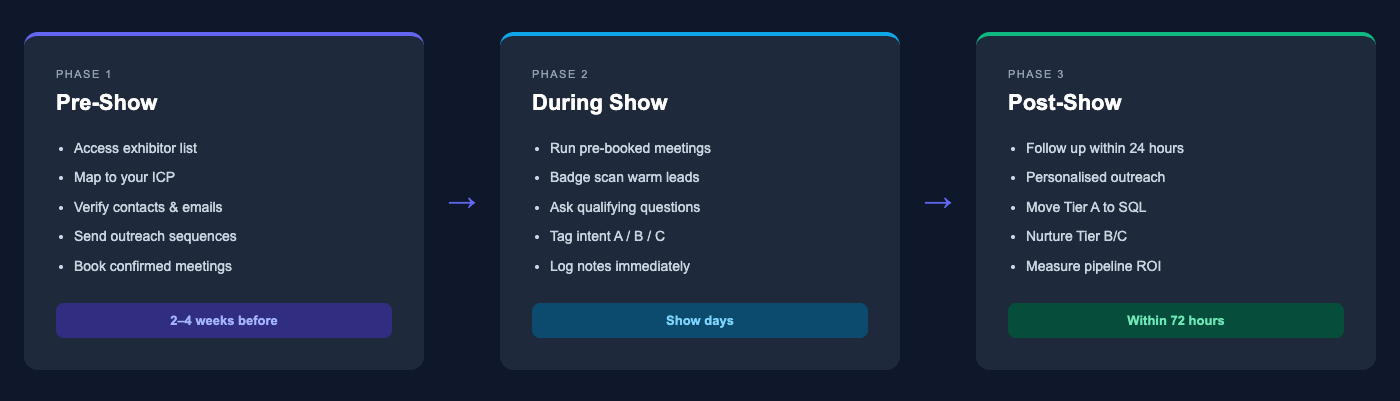
Badge scanning is reactive. You’re waiting for people to come to you. Pre-show exhibitor intelligence is proactive — you choose who you want to meet, qualify them before the event, and book meetings that are already on the calendar when you arrive.
Step 1: Pull the exhibitor list early enough to research it. Many events publish an exhibitor directory on the organizer website. It confirms public event participation, not buying intent, so use it as an account-research starting point.
Step 2: Score against your ICP. Filter by industry, company size, relevant signals, and role. Keep the high-priority list small enough for genuine research and personalized outreach.
Step 3: Draft personalized outreach. Reference the specific event, their company’s presence there, and a relevant pain point. “I noticed [Company] is exhibiting at [Show] next month. We help teams like yours [specific value prop]. Worth a 15-minute meeting while we’re both there?”
Step 4: Book meetings before the doors open. Set the target from rep capacity, expected show-up rate, and historical opportunity conversion. A confirmed calendar reduces dependence on walk-up traffic.
See how Lensmor builds pre-show pipelines →
Watch the workflow
Use this current product tour for the pre-show research steps: find a relevant event, inspect companies and people, review contact fields and export a working list. It supports preparation; on-site capture and follow-up stay in your team’s event and sales process.
Watch on YouTube · 3:34
Trade Show Follow-Up Templates

Speed kills in trade show follow-up — in a good way. These three templates cover the most common scenarios. Customize with specific details from your conversation, and send within 24–48 hours of the event.
Scenario 1: Met at the Booth (No Commitment)
Subject: [Your Name] from [Show Name] — quick follow-up
Hi [First Name], great meeting you at [Show Name] — I enjoyed our conversation about [specific topic they mentioned]. You mentioned [specific pain point or goal], and I think there’s a real fit with how we help teams [relevant outcome]. Would a 20-minute call next week make sense? Happy to share a quick demo tailored to [their use case].
The key: reference something specific from the conversation. “Great meeting you at the show” is forgettable. “You mentioned your team is manually pulling exhibitor lists for 30+ events a year” is not.
Scenario 2: Walked By, Didn’t Stop
Subject: Spotted [Their Company] at [Show Name]
Hi [First Name], I noticed [Their Company] was exhibiting at [Show Name] this week. We help [industry] teams [one-line value prop], and I think there could be an interesting overlap. Worth a 15-minute conversation? No pressure — just curious if [specific problem] is on your radar.
This works because you’re not pretending you had a deep conversation. You noticed them, you did your homework, and you’re reaching out with a reason.
Scenario 3: Pre-Scheduled Meeting (Confirmation + Next Step)
Subject: Next steps from our meeting at [Show Name]
Hi [First Name], thanks for making time to meet at [Show Name]. Quick recap: [2–3 bullet points of key discussion items]. As we discussed, the next step is [specific action]. I’ll send the [deliverable] by [specific date]. Let me know if anything’s changed on your end.
Pre-scheduled meetings deserve the most structured follow-up. Don’t let momentum die with a vague “let’s stay in touch.”

Measuring Trade Show Lead Capture ROI
If you can’t measure it, you can’t improve it. Most teams track total leads collected. That’s vanity. Here are the five metrics that actually tell you whether an event was worth it:
Your Next Trade Show Starts Before You Arrive
If trade shows are on the calendar, begin account research before the event. Compare pre-booked meetings, held meetings, opportunities, pipeline, and total cost with the booth-only workflow. Lensmor supports that preparation through event and exhibitor intelligence, ICP analysis, and relevant contact research.