
Event data management connects information from registration, badge scans, meetings, and research to the right people and accounts in your CRM. A reliable process preserves where each record came from, separates evidence from assumptions, and checks that the intended updates actually happened.
The failure usually starts with a reasonable request: “Can someone upload the leads?” Three files arrive. The same contact appears under two emails. A registration export is labeled “attendees.” A second upload triggers another follow-up. By Friday, sales and marketing disagree about how many conversations the event produced.
The fix starts before that upload. Define what each row represents, which system can change which fields, and what must be true before a record reaches sales. This guide provides a data model, matching rules, an eight-row worked example, and an acceptance checklist for that handoff.
Product documentation checked October 3, 2026. All sample records, costs, and thresholds below are illustrative, not customer results or industry benchmarks.
What should event data management actually preserve?
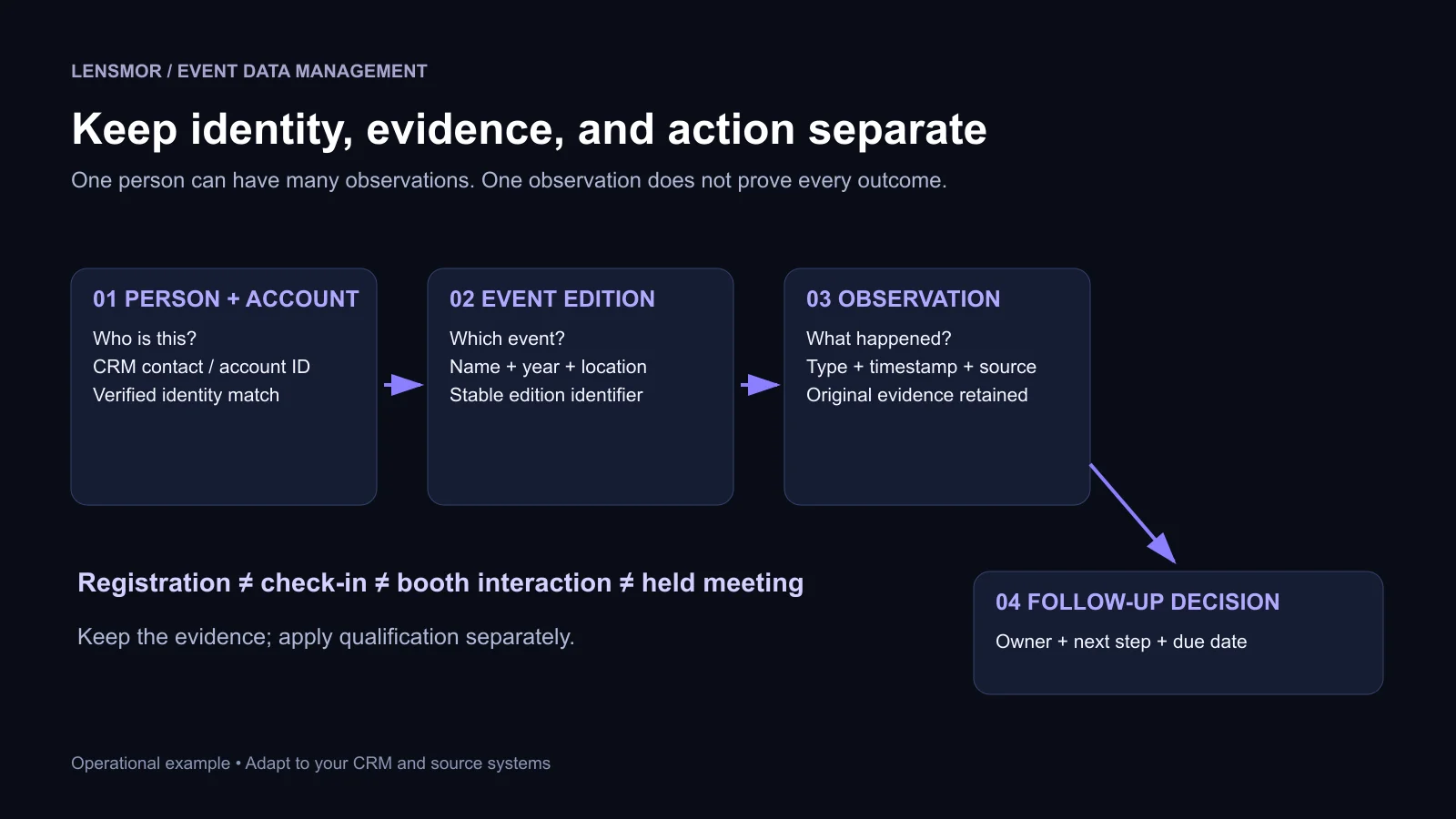
Preserve the relationship between a person, an event edition, an observed action, and its source. A contact record alone cannot tell you whether someone registered, visited your booth, or agreed to a follow-up.
Think in four layers. The person and account establish identity. The event edition establishes context. An observation records something that happened. A follow-up decision records what your team plans to do about it. Mixing those layers makes ordinary reporting questions surprisingly difficult.
This is the data foundation underneath event analytics. Analytics asks what the results mean. Data management makes those results traceable enough to interpret.
An illustrative $24,000 event divided by 240 imported rows appears to cost $100 per lead. If those rows resolve to 180 distinct people and only 30 meet your agreed qualification criteria, the same spend is $133.33 per distinct person and $800 per qualified lead. Nothing about the event changed. The denominator did.
That is why a clean import cannot repair an undefined metric. Agree on the unit before comparing events: observation, distinct person, target account, held meeting, or qualified opportunity.
1. Agree on a small data contract before collecting files
A data contract is a shared definition of what the receiving team needs and what the sending team can actually prove. It can be a one-page spreadsheet. The value comes from explicit meanings and owners, not from adopting a new platform.
Start with the downstream decision. If sales needs to route a technical follow-up, the record needs an account, a relevant person, conversation context, and an owner. Collecting twenty extra demographic fields will not compensate for a missing next step.
Use a staging table between incoming files and the CRM. Preserve the source file unchanged, apply matching and validation in staging, and write only the approved fields to the destination. That gives the team somewhere to investigate conflicts without changing production contacts while guessing.
An evidence reference should identify a record your authorized team can retrieve, such as a registration record or meeting note. It need not reproduce the full source in every system. Keep permissions and retention consistent with the original purpose.
Pro Tip: Put one field owner next to every field you intend to overwrite. “The newest file wins” is a poor rule when an event export contains an older job title than the CRM.
2. Match identity before deciding whether a record is new
Separate matching from enrichment. First determine which person or account a row refers to. Then decide whether the row contains a trustworthy update. A richer-looking record is not necessarily a better match.
When a valid CRM record ID comes from a trusted export of the correct account and object, use it to locate the record. Check conflicting identity information before applying changes. For rows without that ID, use the destination's documented matching behavior and a review path for ambiguous cases.
For example, HubSpot's import documentation lists email, company domain, and Record ID among its identifiers. It also says a mapped Record ID takes precedence over other mapped identifiers. That is a reason to validate an ID column, not to assume it is harmless metadata.
Keep normalization conservative. Trim accidental spaces, preserve the original values, and validate formats. Do not remove dots or plus-addressing from every email address because one consumer provider treats them a certain way. Do not replace a subsidiary with its parent simply because their websites redirect.
There is also a product-specific trap: HubSpot says companies created through its API are not deduplicated by the Company domain name property, including companies created by installed third-party sync apps. Its deduplication documentation describes different behavior for imports. A successful spreadsheet test therefore does not validate an automated company-creation integration.
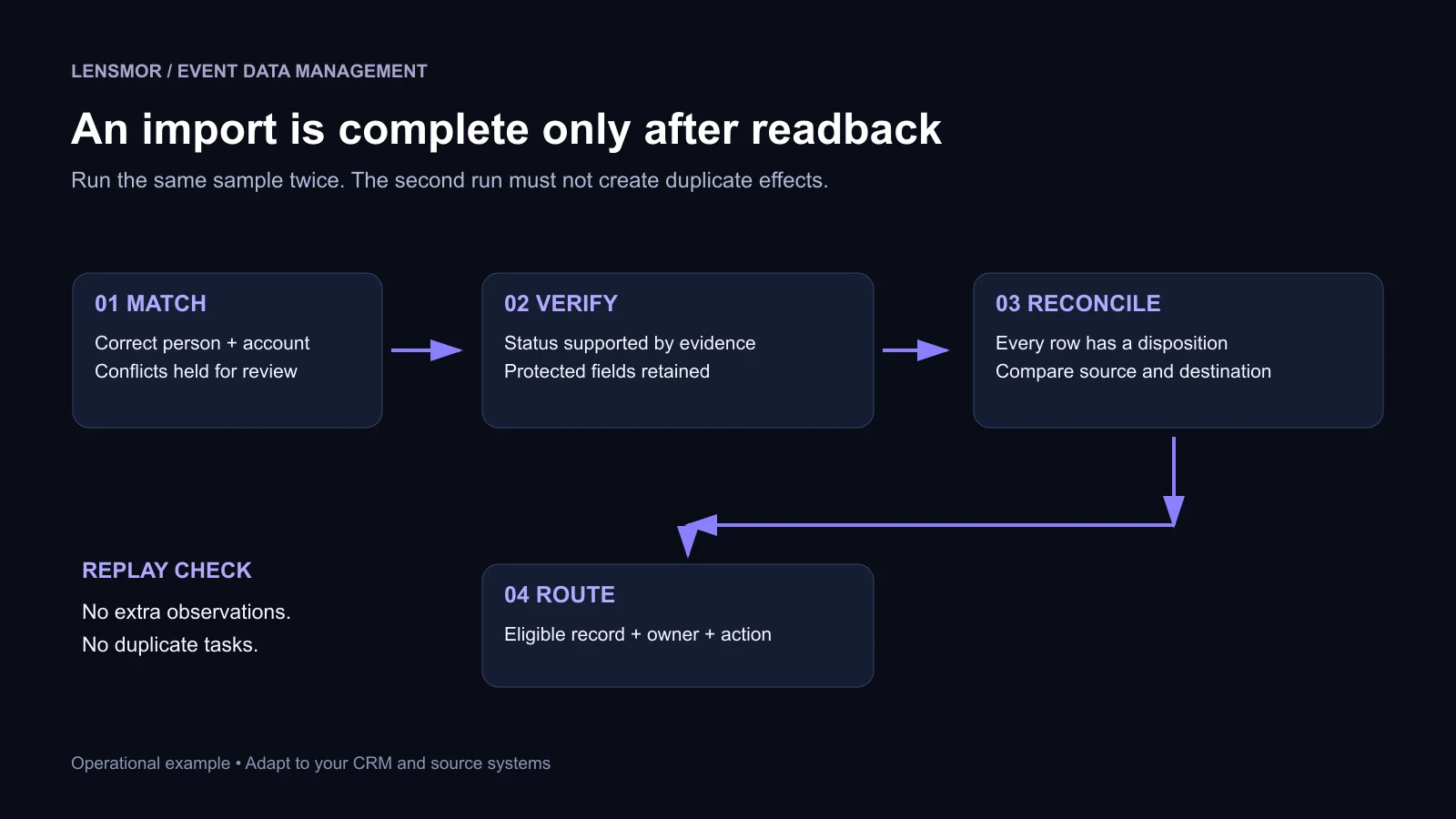
Ask whoever owns the integration to demonstrate a second run of the same sample. The test should show that the integration finds the intended existing account rather than creating another one. Record the actual destination IDs, not just a green success message.
Pro Tip: Test identity conflicts deliberately. One clean contact imported twice is useful; a contact with an existing ID and a conflicting email is more likely to expose a dangerous mapping rule.
3. Give every participation status an evidence rule
Registration, arrival, booth interaction, and a held meeting answer different questions. A single “Attended” column cannot carry all four meanings without misleading someone.
Salesforce's Campaign Member Status guidance uses event statuses such as Invited, Registered, and Attended. Administrators can choose which statuses count as responses. The documentation also makes clear that a member's status does not change automatically simply because that person interacts with the campaign.
Your team still has to define the evidence and implement the update. A field called “Responded” means whatever the configured statuses make it mean; it is not independent proof of attendance or purchase intent.
An absent check-in is not always a reliable no-show. If an entrance scanner failed or some guests bypassed registration, the observation process is incomplete. Record “attendance unknown” until you can reconcile the evidence. Otherwise, a data collection failure becomes a false statement about a person.
Keep event history separately from the current CRM status. Someone can register, cancel, then register again. Someone can attend the conference but miss your meeting. One latest-status field is useful for routing, but it should not erase those distinct facts.
HubSpot's manual marketing-event participant import distinguishes Registered, Attended, and Cancelled activities. Use the appropriate activity supported by the receiving workflow; do not convert a researched contact list into attendance records merely to fit the available options.
4. Define overwrite and retry rules before turning on automation
An integration should be safe to run again. A repeated file or retried request should not create an extra observation, a second contact, or another identical sales task.
Use a stable source record ID when the provider supplies one, scoped to the source system and event edition. Store it with the destination record ID after a successful write. If the provider has no stable identifier, define and test a substitute key; document the possibility that similar-looking interactions are legitimate separate events.
Do not use person plus event as the unique key for every interaction. That would collapse a registration, two booth visits, and a meeting into one record. Conversely, giving a replayed scan a fresh key would inflate the count. Identity, participation, and individual interactions need different keys.
Set field-level authority as well. The registration system can supply registration facts; the meeting owner can confirm that a meeting happened; the CRM remains the reference for account ownership. An enrichment source can propose a job title update without overriding a reviewed account assignment or an existing suppression flag.
A delayed file creates a separate timing problem. Preserve both the time the interaction occurred and the time it entered your system. An imported cancellation from Monday should not blindly overwrite a verified Tuesday check-in because the cancellation file arrived on Wednesday. Resolve chronology and source reliability together, with a documented correction path.
Finally, separate importing data from launching outreach. First validate the records and their associations. Then release eligible records into the appropriate workflow. That separation gives you a chance to catch an incorrect event status before it sends an inappropriate message.
5. Work through a small batch before the full upload
The following eight rows are a fictional acceptance-test fixture. Every ID and record is invented. They are designed to exercise different failure modes, not to represent a conversion benchmark.
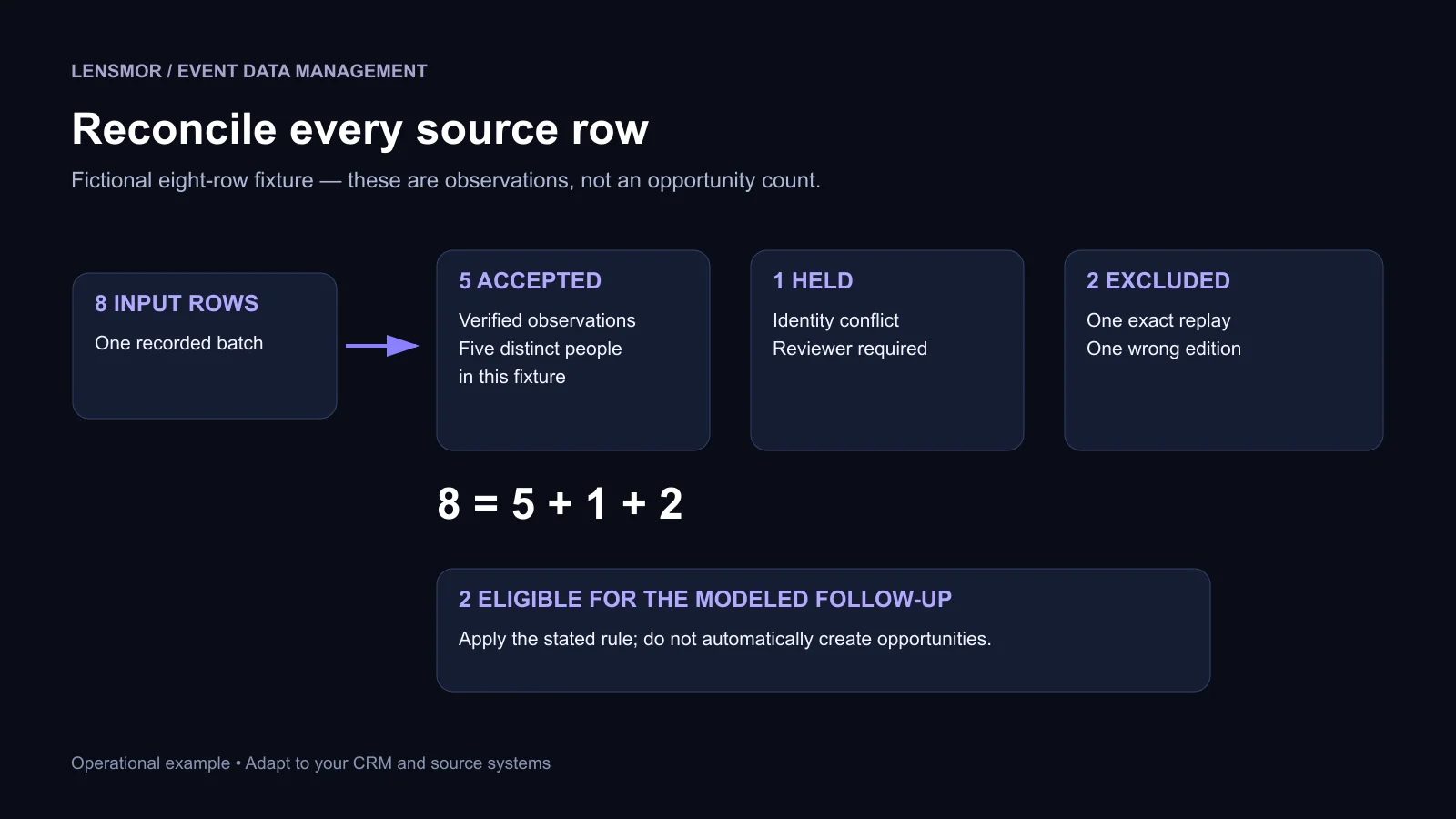
The batch contains eight input rows. Five become accepted observations, one remains on hold, and two are excluded from this batch. In this fixture, the five accepted rows refer to five different people. Two meet the modeled immediate follow-up rule: a verified booth interaction or held meeting, a resolved identity, and no applicable restriction.
Those two records are not automatically two opportunities. Your trade show lead qualification criteria still determine whether the conversation justifies an opportunity or another next step. If your team permits a different registration nurture workflow, report its eligibility separately rather than silently changing this example's rule.
The reconciliation is simple: 8 input rows = 5 accepted + 1 held + 2 excluded. Keep the disposition of every source row, even when several rows ultimately belong to one CRM contact. Otherwise, you cannot explain what happened to the rows that disappeared.
Pro Tip: Add expected results to the sample before you run it. A test is meaningful when you know which record should be created, updated, held, or left unchanged.
6. Measure usable handoffs, not just successful writes
Check the destination from the seller's perspective. Open several resulting records and verify that the account, event, observation, owner, restriction, and next step are correct. Then check exceptions and repeat the sample.
You can calculate an acceptance rate, but label its denominator. In the fixture, 5/8 input rows, or 62.5%, are accepted observations. This is not a people-match rate: the input contains a replay, a research record, and several types of interaction. A dashboard that calls it “lead quality” hides the decisions behind the number.
Likewise, calculate routing completeness over the eligible records, not over all scanned contacts. If both eligible records have an owner and next step, routing completeness is 2/2. That tells you the handoff is operational; it says nothing about how much revenue it will produce.
For an illustrative workload calculation, 40 unresolved records requiring six minutes each represent four hours of review. At an assumed loaded labor cost of $60 per hour, that is $240. Use your own exception volume and time per review to decide whether fixing a recurring source issue deserves priority.
Keep the next event from recreating the same mess
Before the event, agree on field meanings, identity rules, status evidence, protected fields, and owners. Run the sample batch while there is time to change the integration. During the event, keep source IDs and timestamps intact and give staff a short way to record useful conversation context.
Afterward, reconcile the batch before releasing follow-up. Keep an exception queue with owners, then use the post-event report to record recurring failures and changes for the next edition. “Imported successfully” should be the start of verification, not the end of the handoff.
Lensmor can support event-linked company and contact research before the show. Keep that research provenance distinct from registration, check-in, and meeting evidence. A useful prospect record can guide your planning without being represented as a confirmed attendee.
Start with one upcoming event and one representative sample file. If the team can explain every row's identity, evidence, disposition, and next action—and run the file again without duplicate effects—it has a dependable foundation for event reporting and follow-up.
Start Free Trial — Explore relevant events, companies, and contacts with Lensmor, then build your meeting plan around verified account fit.


.avif)